

Table of Contents
Canteens look simple from the outside: people arrive, choose food, pay or use a meal entitlement, collect their meal, and leave. Behind that apparently simple process, however, there can be a surprisingly complicated operation involving employees or students, menus, meal schedules, vendors, inventory, subsidies, payments, billing, kitchen coordination, food wastage, reporting, and compliance. Canteen management software brings these moving parts together in a centralized digital system, allowing organizations to replace paper coupons, spreadsheets, manual registers, and disconnected processes with technology-driven workflows. Modern solutions available in India increasingly combine digital ordering, cashless payments, employee or student identification, inventory tracking, POS billing, meal subscriptions, reporting, and real-time dashboards.
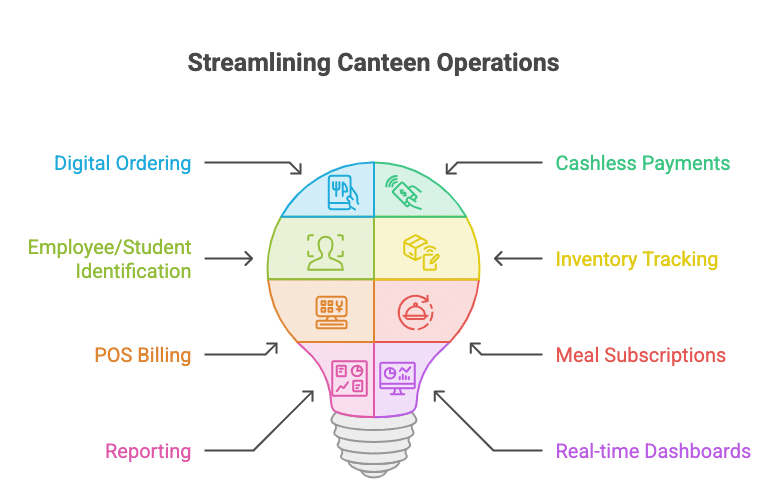
The shift toward digital cafeteria operations is especially relevant for organizations serving hundreds or thousands of meals every day. A factory may need to handle multiple shifts and employee subsidies, while a college may need meal plans and attendance tracking, and a corporate campus may need pre-ordering, multiple food vendors, QR payments, and analytics. Current cafeteria platforms demonstrate that the market is moving beyond simple billing software toward connected systems that link employees, vendors, administrators, kitchens, payments, and operational data. For example, current solutions in India offer combinations of biometric verification, RFID, QR ordering, digital menus, cashless transactions, meal booking, inventory control, and real-time reporting.
What Is Canteen Management Software?
Canteen management software is a digital platform designed to manage the daily activities of a canteen, cafeteria, mess, dining hall, or institutional food service operation. Instead of maintaining separate registers for attendance, meal coupons, sales, inventory, employee deductions, vendor bills, and food consumption, the organization can manage these processes through one connected system. Depending on the software, users may identify themselves through a mobile application, QR code, RFID card, biometric device, or other digital credentials, while administrators can control meal eligibility, menus, pricing, subsidies, and reports from a central dashboard. The basic objective is straightforward: make food service faster, more transparent, easier to monitor, and less dependent on manual work.
Think of the software as the control center of a canteen. The kitchen knows what meals need to be prepared, the cashier knows what has been ordered, the administrator knows how many meals were consumed, the finance team can see costs and subsidies, and employees or students can see menus and balances. Some systems also connect with POS terminals, receipt printers, biometric devices, RFID readers, payment systems, and inventory modules. Current Indian solutions show that canteen platforms can support everything from menu scheduling and user management to coupon billing, food-cost tracking, meal entitlements, and digital reporting.
How a Digital Canteen System Works
A typical digital canteen workflow starts when an authorized user selects or becomes eligible for a meal. The system checks the person’s identity, meal entitlement, subscription, balance, or payment method and then records the transaction. Depending on the setup, the user might scan a QR code, tap an RFID card, use a biometric terminal, place an order through an application, or make a digital payment. The kitchen or vendor then receives the order, prepares the meal, and the system records the transaction for later reporting.
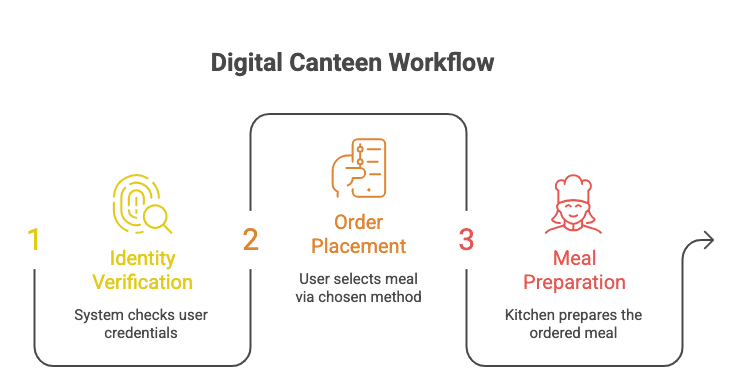
The important part is that information flows through the organization instead of staying trapped in paper registers. If 700 employees consume lunch, management can see the number of meals consumed rather than relying on handwritten counts. If a company subsidizes meals, the software can separate employee and employer contributions, depending on the system’s capabilities. Some current solutions explicitly support department-level entitlements, subsidy management, employee-wise consumption tracking, and reports for management.
Why Traditional Canteen Management Is Becoming Difficult
Manual canteen management becomes increasingly difficult as the number of users, meals, vendors, and transactions grows. Imagine a facility serving 2,000 people across breakfast, lunch, evening snacks, and dinner while also operating multiple counters and shifts. A paper-based system might require employees to collect coupons, staff to count them, managers to reconcile totals, and finance teams to manually calculate subsidies or deductions. One small mistake can then travel through the entire process, creating incorrect reports, billing disputes, food preparation errors, or unnecessary waste.
The problem is not necessarily that the staff are doing poor work. The problem is that humans are being asked to manage large volumes of repetitive information manually. Manual processes also make it harder to identify patterns. If Monday’s meal consumption is consistently lower than Wednesday’s, the kitchen needs that information before preparing food, not weeks later after someone has manually reviewed records. Digital systems provide a stronger foundation because transactions are captured as they happen. Current canteen solutions specifically position automation around problems such as long queues, cash handling, food wastage, proxy usage, manual registers, and limited operational visibility.
Common Problems With Manual Canteen Operations
Manual canteens commonly face several connected problems: long queues during peak meal periods, difficulty tracking consumption, cash reconciliation issues, unauthorized meal usage, inaccurate food forecasting, excessive paperwork, and delayed reporting. When employees or students share coupons or when meal attendance is recorded manually, administrators may struggle to determine whether the recorded number accurately represents actual consumption. Vendor billing can create another challenge when management has to compare invoices against manually collected meal counts.
Food wastage is another major operational concern because food preparation is based on forecasts. If the forecast is based on guesswork, the kitchen may prepare too much food on some days and too little on others. Digital meal booking and historical consumption data can make the planning process more evidence-based. Some current platforms explicitly connect meal tracking, inventory management, recipe costing, and waste management, demonstrating how modern canteen software can connect the front-end dining experience with back-end food operations.
Key Features of Canteen Management Software
The strongest canteen management software solutions usually combine several modules rather than offering only billing. These modules can include POS billing, meal booking, user management, menu scheduling, inventory control, subscription management, digital payments, employee subsidies, vendor management, kitchen order management, reporting, and integrations with biometric or RFID hardware. The exact feature set varies considerably between products, so organizations should avoid choosing software simply because a vendor advertises a long list of features. What matters is whether the features actually fit the organization’s workflow.
For example, a college hostel may prioritize student attendance, meal subscriptions, QR scanning, and monthly billing, while a factory may prioritize biometric authentication, multiple shifts, subsidies, and employee deductions. A corporate office might care more about pre-ordering, cashless payments, vendor performance, menu feedback, and cafeteria analytics. Current products in the Indian market demonstrate this range: some focus heavily on employee entitlements and food-cost management, while others emphasize digital ordering, cloud POS, subscription plans, and workplace cafeteria analytics.
Digital Ordering and POS
A modern POS module allows users to order food, process payments, generate receipts or tokens, and maintain transaction records without relying on handwritten bills. QR ordering can allow customers to select food from a digital menu, while a cashier can process walk-in orders through a touch-friendly interface. In larger operations, orders can be routed toward the appropriate kitchen or counter so that staff know what needs to be prepared.
The real benefit is speed combined with accuracy. During a busy lunch period, every second matters because a small delay at one counter can become a long queue within minutes. Digital POS systems can also make it easier to track item-level sales, payment modes, and transaction histories. Current canteen platforms advertise QR ordering, POS billing, receipt printing, online and offline order handling, and digital payment capabilities as part of their operational stack.
Employee, Student, and User Management
User management is one of the most important parts of a canteen system because food access often depends on identity and eligibility. In a corporate environment, an employee may receive a specific meal subsidy, while a contractor may have a different entitlement. In a college, a student may have a monthly mess plan, while a visitor may need a temporary meal pass. The software can associate these rules with user profiles and apply them automatically when meals are consumed.
This approach reduces the need for staff to remember individual policies. It also creates a digital history that can be used for audits and reporting. Current solutions support employee or user registration, department-level organization, company or institution grouping, and meal entitlement management.
Meal Booking, Coupons, and Subscription Management
Meal booking is particularly useful when the kitchen needs advance visibility into demand. Instead of discovering at lunchtime that hundreds of people want a particular meal, employees or students can reserve meals before a cutoff time. The system can then provide the kitchen with a more reliable estimate of expected demand. Subscription management extends this idea by allowing users to operate under monthly, prepaid, package-based, or other meal-plan models.
Digital coupon systems can also replace physical paper tokens. A user may receive a digital entitlement and redeem it using a QR code, RFID card, biometric verification, or another approved method. This reduces the administrative effort involved in printing, distributing, collecting, and counting physical coupons. Current software products in India offer coupon-based billing, prepaid cards, meal subscriptions, prepaid wallets, and employee meal entitlements, although the precise model differs from platform to platform.
Inventory and Food Cost Management
Inventory management connects the canteen’s purchasing activity with actual food consumption. Instead of simply knowing that ₹100,000 worth of groceries were purchased, managers can work toward understanding which ingredients were consumed, how much food was prepared, and where costs are increasing. Advanced systems can connect menu planning with recipes and ingredient requirements, giving managers a better basis for purchasing decisions.
This matters because food businesses operate on relatively tight margins. Buying too much creates excess stock and potential spoilage, while buying too little creates shortages and emergency purchasing. Inventory software can provide stock levels, consumption information, and low-stock alerts depending on the implementation. Current canteen software products specifically promote ingredient tracking, recipe costing, inventory management, and food-cost monitoring as tools for controlling operational expenses.
Reducing Food Waste With Better Forecasting
Food waste is rarely caused by a single mistake. It can emerge from inaccurate attendance estimates, unexpected absenteeism, menu preferences, overproduction, poor inventory rotation, or insufficient communication between the front counter and kitchen. A digital canteen system cannot magically eliminate waste, but it can give managers better information with which to make decisions.
Suppose the system shows that a particular meal is consistently selected by 900 people on Fridays but only 500 people on Mondays. The kitchen can use that history when planning production rather than applying the same quantity every day. Meal pre-booking can improve this further because it provides forward-looking demand information. Current platforms connect menu planning, attendance, inventory, food consumption, and waste-related information, making data a practical input into daily kitchen decisions.
Cashless Payments and Digital Billing
Cashless payments are now an important part of modern canteen operations. Depending on the organization, users may pay through UPI, cards, digital wallets, prepaid balances, meal cards, QR codes, or other supported payment methods. A cashless model can reduce the amount of physical money handled at the counter and make transaction reconciliation easier. It also gives users a faster way to complete purchases during busy meal periods.
Digital billing has a second advantage: visibility. Instead of looking only at total cash collected, administrators can analyze transactions by item, counter, user group, department, date, meal period, or payment method when the software supports those dimensions. Some workplace cafeteria platforms also combine payments with pre-ordering and real-time dashboards, creating a more connected dining experience.
Menu Management and Meal Scheduling
Menus are the heartbeat of any canteen because they influence what customers expect, what kitchens prepare, and what ingredients need to be purchased. Canteen software can allow administrators to create daily or weekly menus, categorize meals by breakfast, lunch, snacks, or dinner, and publish changes digitally. This is particularly useful for institutions that operate rotating menus or special menus for particular days.
Digital menus can also improve communication. Instead of printing a new notice whenever an item changes, the administrator can update the menu through the system. Employees or students can then view the latest information through a supported application, kiosk, website, or display. Current cafeteria solutions provide menu scheduling and digital menu functionality, with some platforms allowing employees to browse live menus and pre-order meals.
Reports, Analytics, and Real-Time Dashboards
Data becomes valuable when it helps someone make a better decision. Canteen management software can transform individual transactions into operational reports covering meal counts, sales, subsidies, food costs, user consumption, inventory, vendor performance, and other metrics supported by the platform. Management can then move from asking, “What happened?” to asking, “Why did it happen, and what should we change?”
For example, if meal consumption increases sharply but food costs rise even faster, management may investigate ingredient prices, portion sizes, menu composition, or wastage. If one vendor receives significantly lower ratings than another, the organization can investigate quality or service issues. Current cafeteria systems increasingly promote real-time dashboards covering spending, footfall, feedback, compliance, sales, and performance.
Biometric, RFID, QR, and Smart ID Integration
Authentication is particularly important in institutional and corporate canteens where food subsidies or meal entitlements are involved. A biometric device can identify an employee, while RFID can allow a user to tap a card, and QR technology can provide a mobile-friendly alternative. The right option depends on the environment, security requirements, user convenience, hardware availability, and privacy policies.
The goal is not technology for its own sake. The goal is to make the meal transaction both convenient and controlled. A system can verify whether a person is eligible for a particular meal, record the transaction, apply a subsidy or deduction, and generate a token where required. Current Indian solutions describe integrations with biometric terminals, RFID cards, printers, QR codes, and other identification methods, while some cloud systems support multiple terminals over LAN or WAN.
Canteen Management Software for Corporate Offices
Corporate cafeterias have unique requirements because the canteen is often part of the employee experience as well as a business operation. Employees may expect quick service, digital menus, cashless payments, pre-ordering, multiple vendors, healthy choices, and easy feedback. At the administrative level, HR, facilities, finance, procurement, and vendors may all need different information from the same system.
This makes centralized software especially useful. An administrator can monitor cafeteria activity without standing at the counter, while employees can interact with the food service through an application or digital interface. India’s workplace cafeteria technology market includes platforms designed to connect employees, food vendors, facilities teams, and management through a single operating layer. HungerBox, for example, currently describes digital meal booking, smart cafeteria technology, vendor governance, and real-time visibility as part of its corporate cafeteria solution.
Canteen Management Software for Schools and Colleges
Educational institutions face a different combination of challenges. Students may operate on monthly mess plans, prepaid balances, meal quotas, or scheduled dining programs. The institution may need to track attendance, prevent duplicate meal claims, manage visitors, communicate menus, and generate monthly reports. Parents or administrators may also expect greater transparency around payments and meal consumption.
A digital system can connect student profiles with meal eligibility and attendance. QR codes, RFID, biometric identification, or mobile-based workflows can reduce dependence on paper registers. Cloud-based mess platforms currently market features such as menu planning, student attendance, automated billing, inventory tracking, and meal-plan management specifically for educational and hostel environments.
Canteen Management Software for Factories and Industrial Facilities
Factories often operate multiple shifts, which makes canteen management more complex than a standard office cafeteria. Breakfast may be served to one shift while lunch is served to another, and employee subsidies may vary according to employment category or company policy. A manual coupon process can become difficult when thousands of workers move through the canteen within a limited window.
Software can help by connecting employee identity with shift schedules, meal eligibility, and consumption. It can also help management compare expected meal counts against actual consumption. Some current industrial canteen systems specifically support employee meal tracking, shift-based access, subsidy management, biometric authentication, and reporting.
Benefits for Employees, Students, and Customers
The most visible benefit of canteen software is convenience. Users can potentially browse menus before arriving, reserve meals, make cashless payments, scan a QR code, tap an RFID card, or use another digital identification method depending on the implementation. Faster transactions can reduce queues, particularly during short lunch or break periods when hundreds of people may want food simultaneously.
There is also a transparency benefit. A user can have a record of transactions, balances, meal plans, or subscriptions rather than depending entirely on paper receipts. Digital feedback can provide another communication channel between customers and canteen operators. Modern workplace cafeteria platforms increasingly combine ordering, payment, menu browsing, feedback, and real-time updates into one user experience.
Benefits for Canteen Owners and Administrators
For administrators, the biggest advantage is control. Instead of collecting information from several disconnected sources, management can access a centralized view of transactions, users, food consumption, inventory, and operational performance. This can reduce repetitive administrative work and make audits easier because records are digitally stored.
Canteen owners can also use software to improve operational efficiency. POS records can reveal which products sell best, inventory records can identify stock movement, and consumption reports can support better food preparation. Organizations can compare vendor invoices with system-generated meal data when the software supports that workflow. Current canteen systems explicitly highlight benefits such as automated reporting, food-cost tracking, subsidy management, inventory visibility, and reduced manual reconciliation.
How to Choose the Best Canteen Management Software
Choosing the best canteen management software should start with the organization’s actual workflow rather than a vendor’s feature list. First, identify how many users consume meals, how many meals are served each day, how many counters or kitchens operate, whether multiple shifts exist, how payments are handled, and whether subsidies or meal entitlements apply. Then identify the biggest operational problems: long queues, food waste, billing errors, inventory problems, unauthorized access, poor reporting, or vendor reconciliation.
After defining those requirements, compare software based on usability, integrations, reporting, scalability, security, support, and total cost. A system that looks impressive in a demo but requires complicated manual work will not solve the underlying problem. It is also important to test the software with real workflows before deployment, including peak-hour ordering, refunds or corrections, user registration, menu changes, offline scenarios, and reporting.
Essential Questions to Ask Vendors
Before purchasing, organizations should ask whether the software supports their required authentication methods, payment systems, POS hardware, printers, accounting tools, HR systems, and existing employee databases. They should also ask how data is backed up, how permissions work, how updates are handled, and what support is available after implementation. If the canteen operates across multiple locations, the vendor should explain how centralized reporting and location-level controls work.
Pricing deserves careful attention as well. Instead of looking only at the monthly subscription, calculate the total cost of software, hardware, implementation, training, integrations, support, and future expansion. Ask for a realistic demonstration using your own canteen workflow rather than a generic presentation. The right software should make everyday work simpler, not create a second administrative system that staff must maintain alongside the first.
Cloud-Based vs On-Premise Canteen Software
Cloud-based software is increasingly attractive because users can access centralized data without maintaining all application infrastructure locally. Administrators may be able to monitor operations from different locations, while vendors can provide updates centrally. This model can be particularly useful for organizations operating multiple cafeterias or locations because information can potentially be consolidated into a single platform.
On-premise systems can still be appropriate where organizations have specific infrastructure, connectivity, security, or integration requirements. The decision should not be based on the assumption that one model is automatically superior. Instead, consider internet reliability, data policies, existing IT infrastructure, integration requirements, maintenance responsibilities, and expected scale. Some current canteen solutions explicitly support cloud deployment and remote connectivity, while others provide offline capabilities or hybrid operational approaches.
Implementation, Training, and Integration
Buying software is only the beginning. Successful implementation requires mapping the existing canteen process into the new digital workflow. This can include importing employee or student data, configuring menus, creating meal plans, defining subsidies, connecting payment systems, installing biometric or RFID devices, setting up printers, configuring user permissions, and training staff.
A phased implementation can reduce risk. Organizations can begin with one counter or one location, test the system during normal and peak periods, collect feedback, fix problems, and then expand. Staff training is equally important because even excellent software can fail when employees do not understand how to handle exceptions. Current providers advertise implementation assistance, training, hardware integrations, and technical support as part of their canteen management offerings, showing how deployment support has become an important part of the software proposition.
Future of Canteen Management Software
The future of canteen management is likely to move toward increasingly connected, data-driven dining environments. Mobile ordering, cashless payments, digital menus, biometric and RFID authentication, automated inventory management, vendor analytics, and real-time dashboards are already appearing across modern cafeteria systems. The next stage will likely focus less on simply recording transactions and more on using operational data to predict demand, improve food planning, personalize experiences, and identify inefficiencies.
Artificial intelligence and predictive analytics could eventually help organizations forecast meal demand based on historical consumption, booking patterns, working schedules, holidays, and other operational variables. Connected systems may also make it easier to coordinate procurement, kitchen production, vendor performance, and customer feedback. The direction is clear: the canteen is becoming a digital operation rather than simply a physical food counter. Current workplace platforms already describe connected ecosystems in which employee orders, vendor operations, and analytics feed into one another.
Conclusion
Canteen management software has evolved from basic billing technology into a broader operational platform for managing food service from end to end. The right system can connect users, menus, meal entitlements, ordering, payments, inventory, vendors, kitchen operations, and management reporting. For a small canteen, that may mean replacing paper registers with digital billing; for a large corporation, factory, university, or hospital, it can mean coordinating thousands of meals across multiple shifts, counters, vendors, and locations.
The most important question is not whether an organization needs “software” simply because digital transformation is popular. The real question is where the current canteen operation loses time, money, food, or visibility. If queues are too long, look for fast ordering and payment. If food is wasted, prioritize forecasting, meal booking, and inventory controls. If subsidies are difficult to reconcile, prioritize entitlement and consumption tracking. If management lacks visibility, prioritize dashboards and reporting. When technology is selected around real operational problems, canteen management software can become the digital backbone of a faster, more transparent, and more efficient food service operation.
FAQs About Canteen Management Software
1. What is canteen management software?
Canteen management software is a digital platform used to manage food-service operations such as ordering, billing, meal attendance, menu scheduling, inventory, subscriptions, employee or student entitlements, payments, and reporting. Depending on the product, it can also integrate with QR codes, RFID cards, biometric devices, POS terminals, receipt printers, and mobile applications. The objective is to replace repetitive manual processes with centralized digital workflows and better operational visibility. Modern solutions can be used in corporate cafeterias, factories, schools, colleges, hospitals, hostels, and other institutional dining environments.
2. What are the main features of canteen management software?
Common features include POS billing, digital ordering, meal booking, menu management, employee or student management, subscription plans, coupon management, cashless payments, inventory management, food-cost tracking, vendor management, and reports. More advanced systems may include biometric authentication, RFID integration, QR ordering, real-time dashboards, feedback systems, and multi-location management. The exact features vary between providers, so organizations should evaluate software according to their actual requirements rather than selecting a platform based only on the number of advertised features.
3. Can canteen software reduce food wastage?
Yes, it can help reduce wastage by giving kitchen and management teams better information about expected and historical consumption. Meal booking can provide advance demand information, while inventory and consumption tracking can help managers understand how ingredients are being used. Recipe costing and waste tracking can provide additional visibility into food costs. However, software is a management tool rather than a guarantee; the organization still needs accurate data, good kitchen processes, appropriate purchasing, and disciplined operational practices.
4. Is canteen management software suitable for factories and corporate offices?
Yes. Corporate and industrial environments are among the major use cases because they often serve large numbers of employees and may operate multiple shifts, meal subsidies, vendors, and cafeteria counters. Software can support employee identification, meal entitlements, digital ordering, cashless payments, reporting, and vendor management. Some current Indian platforms specifically target corporate cafeterias, factories, and large workplace dining environments.
5. How much does canteen management software cost?
There is no single standard price because costs depend on the number of users, locations, modules, integrations, hardware, implementation requirements, and pricing model chosen by the provider. Some solutions use subscriptions, while others may involve setup fees, hardware charges, or customized enterprise pricing. The best way to compare options is to calculate the total cost of ownership, including software, hardware, implementation, training, support, integrations, and future expansion. A low software price may not be the cheapest overall solution if it requires significant additional hardware or manual work.